

04 Parameters (LTI)
Whenever external learning content is integrated into a course via the LTI tool course element, the learning platform transfers information to the external tool when the LTI link is used. This data transfer enables the tool to clearly identify the course, the participant, and the respective situation of use.
Apart from anonymous context information, you can specify which additional information should be sent to the LTI tool in the Parameters tab of the LTI Tool course element.
Configurations in the parameters tab
The following areas are available:
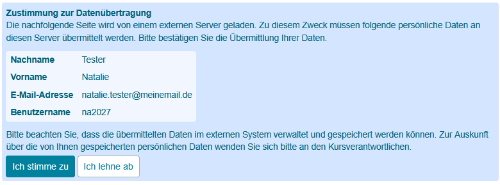
User Data (1)Activate the checkboxes for the optional user information you require. The participant is required to actively consent to the transfer of this data in the course view before they can use the LTI tool.
|  |
Additional parameters (2)In this section, configure fixed key values, such as content ID, language, etc. | |
Individual assessment and user dataAssign a separate parameter name (3) in this section and enter the required user-dependent values such as user attributes, user settings, evaluation or progress data via expert rule (4) in the text field. The result of the entered expert rule is transferred to the LTI tool as a string. The Preview button (5) offers a test evaluation. The participant is required to actively consent to the transfer of this data before they can use the LTI tool.
|  |

Beispiele zur Wertekonfiguration
Key-Value-Werte.
Beispielkonfiguration mit einem festen Key-Value-Paar aus einer Anbindung eines Programmierlerntools. Der übergebene Parameter "task=juice-setvar-interactive" zeigt dem Anwender im Kursrun nur die konkrete Programmieraufgabe.

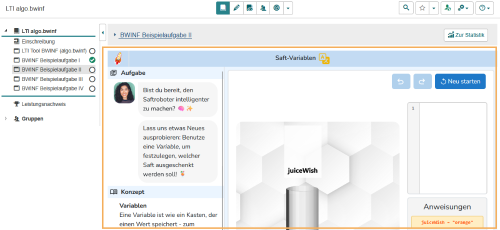
Die konkrete Anbindung des Programmierlerntools wird auf der Seite Anbindung der Plattform algo.bwinf (Bundesweite Informatikwettbewerbe) beschrieben.
Nutzerabhängige Key-Value-Werte
| Übergabe von | Beispiele | allgemeine Expertensyntax | Konkretes Beispiel aus einem Testkurs |
|---|---|---|---|
| Nutzerattribute und Nutzereinstellungen | Übergabe des Studiengangs | getUserProperty("[string]") | getUserProperty("studySubject") |
| Übergabe der eingestellten Systemsprache | getUserProperty("language") | ||
| Zugehörigkeit zu einer bestimmten Lerngruppe | Übergabe der Zugehörigkeit zur Lerngruppe "Anfänger" | inLearningGroup("[string]") | inLearningGroup("Anfänger") |
| Bewertungsdaten | Punktzahl des Kursabschnitt 1 - Übergabe der Punktzahl eines ONYX Tests | getOnyxTestOutcome("[string1]","[string2]") | getOnyxTestOutcome("1670470101589006009","SCORE") |
| Bewertung des Kursabschnitt 2 - Kursbaustein bestanden | getPassed("[integer]") | getPassed("84389429397045") | |
| Lernfortschritt oder Bearbeitungszustand | Übergabe der gestarteten Versuche eines Kursbausteins | getAttempts("[integer]") | getAttempts("1670470101589006009") |
| Bearbeitungsstand (Kursfortschritt). | getProgress("[integer]") | getProgress("1670470101585115009") | |
| Kombination mehrerer Informationen | getUserProperty("[string1]") + getUserProperty("[string2]") + getUserProperty("[string]") | getUserProperty("firstName") + getUserProperty("language") + getUserProperty("studySubject") |
