
Set Options
Use the various configuration options in the tab Options to adapt questions according to your needs.

ONYX._Include Library.Optionen.Lösungsversuche.WebHome
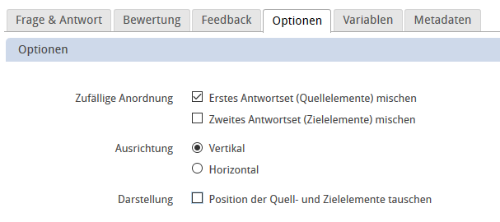
Shuffle
The answers for most question forms are by default arranged in random order. As a result, the question will appear different for each test participant and attempt. However, for some questions, it may be desirable that the answers will not be randomly arranged. In these cases, the setting Shuffle can be disabled in the Options tab.

For match interactions, it is further possible to disable the shuffle option per answer set.

Orientation and swapping elements
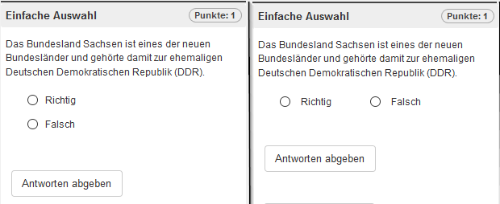
The answers for most question types are by default arranged in vertical order, i. e. one above the other. But you can also configure the orientation to be horizontal. However, in the case of a larger number of possible answers, a horizontal orientation is not recommended for visual reasons and because it might impair the usability of tests on mobile devices such as smartphones.
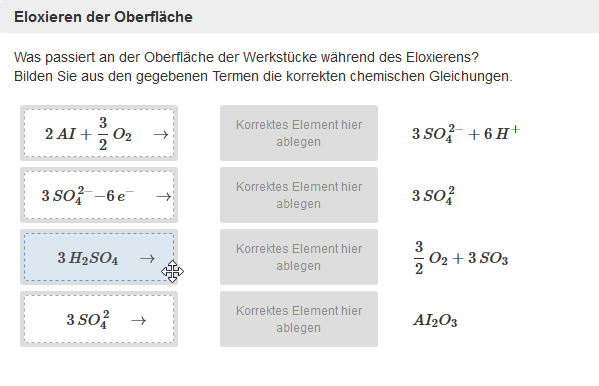
For match interactions, it is further possible to swap the location of the source and target elements, in addition to configuring the horizontal and vertical orientation. This allows the implementation of concrete technical content, for example mathematical or chemical equations. If the beginning of the equation is provided and the participant has to find the correct end of the equation or its solution, we recommend enabling the configuration Swap source and target elements.
By default, the source elements will be assigned by the participants. The assignment is done from left to right. Therefore, the participant has to match the source elements on the left with the correct target elements on the right. |
|
By activating the option Swap source and target elements, it will be the other way round, i. e. the target elements have to be assigned by the participants. This also implies that the source elements will now be provided on the right and the target elements on the left. |
|


ONYX._Include Library.Kommentare.WebHome
Use comments in a question | To use the comment function for a question, proceed as follows:
|
Extended settings
ONYX._Include Library.Externe Datei.WebHome
Examples of using a layout file for ONYX test questions:
- ONYX.Erstellung von Testinhalten.Aufgabentypen.Lueckentext.Luecken auf einer Hintergrundgrafik platzieren.WebHome
- ONYX._Include Library.Externe Datei.Layout Einstellungen.Zuordnungselemente anpassen CSS.WebHome
- ONYX._Include Library.Externe Datei.Layout Einstellungen.Richtig Falsch-Kennzeichnung ausblenden.WebHome