

07 References
The References section lists all existing links for a resource. They can be linked to courses in the connected OPAL learning platform or to other resources within the question bank.
View references
You can recognize any references to a piece of content in the table view of the question bank by a bracket icon next to the resource  .
.
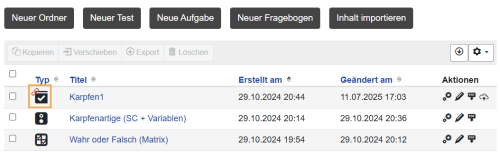
To open the reference management area, click on the cog icon in the Question Bank table and switch to the References tab in the dialogue box.
- The Referenced Courses section lists all courses on the connected OPAL learning platform in which the test or questionnaire is already being used. These references cannot be set or removed in the question bank.
- The Existing References section displays all other existing links within the question bank. The Existing References section displays all other existing links within the question bank. You can add and remove these links in the question bank. This is a great way to organize variants or language translations, for example.
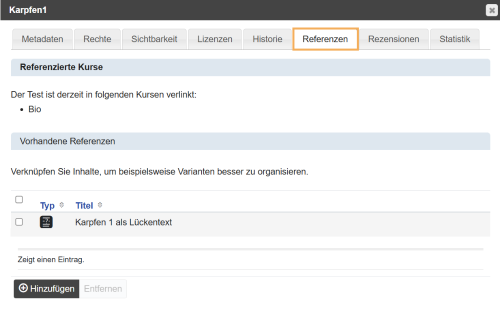
All users who have at least reading access to a resource can view references. Content release is controlled via rights assignment and management.
Instructions on removing OPAL references can be found on the OPAL help page Test.
You can only find references to OPAL courses here. Other references that may prevent the deletion of resources can arise from published content. If this is the case, check the publications of the resource. Learn more about this here Publish Test. You can also see whether references exist in the table view of the task pool by a bracket icon next to the resource  .
.